

Most online audiences don’t expect perfect spelling, but they do expect you to make an effort. Every error, no matter how small, increases the odds of your reader deciding you haven’t worked hard enough to earn their attention. This guide to self editing for bloggers will help you learn how to edit a blog post and keep your audience’s interest.
Here’s everything you need to know:
The importance of learning how to edit a blog post
Self editing is one of the most essential skills for bloggers to learn. You might want to hire an editor for your blog eventually, but in the early days, it’s a significant expense with no guaranteed return on investment. But you still need to be publishing quality, polished articles if you want your blog to look like a professional publication.
Until you’re seeing major conversions from your blog and/or managing a team of writers, self editing is the most efficient and cost-effective way to ensure that quality and polish. That said, you will need to pick up a few skills – and some tools – to do it right.
It’s also worth acknowledging that today’s LLM tools can handle a large portion of the editing process for you. However, knowing how to edit your own work is still essential. Tools can improve writing, but they don’t fully understand your intent, your audience, or your goals. Without a solid editing foundation, it’s easy to accept suggestions that make your content more generic, less accurate, or less aligned with your original message.
How to edit a blog post in five simple steps
You can edit your articles by completing the following steps:
Quick summary: Edit your post by first tightening the writing for clarity, then adding visual aids where they help, proofreading for grammar and consistency, optimizing the post for search, and finally previewing it before publishing. If you use a checklist for each step, the whole process becomes faster and more repeatable.
1. Clarify and condense
The first goal of learning how to edit a blog post is to make sure that the article gets the point across clearly, ideally in the briefest possible amount of time. It’s all right if your writing style is a little on the wordy side, but eliminate any tangents or redundant phrases. You should also make sure any professional jargon is either explained or traded out for words your audience will understand. If you use professional jargon frequently, consider creating a glossary page you can link to.
At this point, you should also double check all your research and links. One wrong fact or broken link can undermine your whole article, so read every source thoroughly before you use it.
This step should come first in the editing process because it typically involves the largest changes, and you don’t want to fix the grammar and SEO of a section only to delete it later.
2. Add charts and tables
This step isn’t mandatory for every article, but you should always be looking for opportunities to create charts and tables. These visual aids make the information more appealing and easier to digest. They’re also a great way to break up long chunks of text, which is particularly important when you’re working on longer articles.
You can create charts and graphs of all kinds using our Visualizer Plugin, and a shortcode plugin can help you quickly compile information into HTML tables.
Here’s an example chart from another post of ours:
For example, if your draft includes a dense paragraph comparing several tools, prices, or features, you can often make it easier to scan by turning that section into a table. In the same way, if you’re explaining a trend or sharing survey data, a simple chart may communicate the idea faster than another 150 words of text.
3. Proofread
The third step to mastering how to edit a blog post is all about diving into the details of spelling and grammar. Breaking the occasional rule can be a great way to create a more conversational tone, but your article should generally follow the established rules of grammar.
If spelling and grammar aren’t things that come naturally to you, use a tool like Grammarly to keep you on track. Grammarly now does more than catch spelling mistakes: it can also help with clarity, tone, concision, and sentence rewrites. Those features can speed up proofreading, but you’ll still want to review suggestions carefully to make sure your post keeps its original meaning and voice.

💡 Pro tip: Modern LLM tools (like ChatGPT) are extremely effective for proofreading and rewriting sections quickly. They can catch awkward phrasing, simplify sentences, and improve clarity in seconds. That said, tools like Grammarly are still valuable because they provide real-time suggestions as you write, helping you catch issues earlier in the process instead of fixing everything at the end.
4. Optimize for SEO
At this point your article is ready for reading; now you need to prepare it to be found. At Themeisle we do this part using the Yoast SEO plugin.
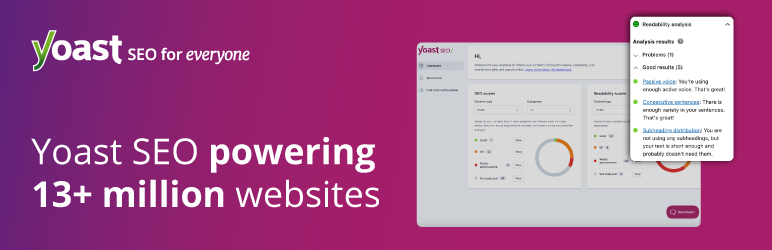
This plugin makes technical SEO editing for bloggers a breeze, assessing your articles for readability and SEO in real time. Simply install the plugin, choose a focus keyword or keyphrase for your post, and Yoast will walk you through the steps to optimize your article. The free plugin covers the core readability and SEO checks, while premium features expand things with options like related keyphrases, synonyms, and other more advanced optimization help.
Here’s what you can expect to see from the plugin:

Don’t already have a focus keyword? Take the time to do some keyword research. Research specific terms related to your article, and pay special attention to possible long tail keywords. This step is essential if you want to improve your blog’s organic search engine traffic.
💡 Alternative SEO Tool: If you like having options to choose from, a comparable WordPress SEO plugin is Rank Math. Both Yoast and Rank Math are mature SEO plugins with different interfaces, workflows, and feature bundles, so the right choice depends on your preferences, budget, and the kind of content analysis you want built into your editor.
5. Preview the post
You’ve now spent anywhere from half an hour to two hours editing your article and you’re itching to hit the “Publish” button, but I urge you to take one final step: click on the “Preview” button in your admin panel.

There are two reasons for this. First, if you’re primarily a writer or business person, there’s a good chance you’ll click one of the editor buttons by accident without even noticing it, and that can completely break an article. Second, looking at the preview allows you to see the article in a new light, which can make other errors leap out at you. This is why many authors print their books out to edit them, rather than doing edits on the same screen where they wrote them.
💡 Pro Tip: If your blog has an RSS Feed, subscribe to it yourself. This gives you one last chance to immediately catch errors and fix them before your readers notice.
Your self editing checklist
This might seem overwhelming at first, but you can streamline the process by taking each article through a self editing checklist.
Here’s an example of what that checklist might include:
- Does every section support the main idea of the article?
- Are all facts accurate and all sources trustworthy?
- Have I removed unnecessary words and repetition?
- Have I added visuals where they improve clarity?
- Does the article align with search intent?
- Have I checked internal links, headings, and metadata?
- Have I previewed the post on desktop and mobile?
- Have I looked for formatting issues or broken elements?
Optional items
You may also want to include questions more specific to your blog. For example, the Themeisle blog has specific word count requirements, so I always make sure my articles are within the accepted range. Other guidelines you might want to consider are how/when you’ll use images, your citations, and HTML guidelines.
How to use your editing checklist
Put your editing checklist in a Google Doc and keep it open in a separate tab when you’re editing articles. You’ll need to refer to it frequently when editing the first several articles, but after a while you’ll hardly need to look at it at all.
You can work through each point individually, but I like to choose two to three items to tackle with each revision. That cuts down my overall number of revisions while still ensuring that every item is completed. As you edit more articles you’ll be able to discover the exact process that works for you.
Final advice 🏁
Editing your articles is essential if you want your blog to look professional. The easiest way to do this is to create an extensive editing checklist and to walk every single article through that checklist.
You may also want to consider going through your archives and walking old articles through your updated editing checklist, all the way from editing for clarity to improving the SEO. This can help you get the most out of your old blog content.
Do you have any questions on how to edit a blog post? What does your editing process look like? Let us know in the comments section below!

FREE GUIDE
4 Essential Steps to Speed Up Your WordPress Website
Follow the simple steps in our 4-part mini series and reduce your loading times by 50-80%. 🚀


Great post. This should be printed and tacked to every blog post writer’s wall. Being your own editor is dangerous so a checklist like this will help the smaller bloggers too.