

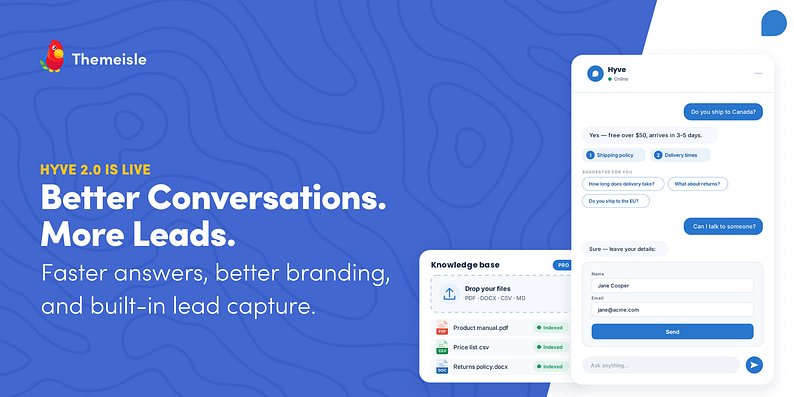
A visitor is about to leave your pricing page when Hyve opens with a simple question: any questions before you go? They ask whether their plan covers multiple sites. Hyve answers in seconds and links to the page that confirms it. They then ask to talk to an expert, and Hyve opens a lead form right in the chat. The lead lands in your dashboard with the full conversation attached.
That’s Hyve 2.0 in one visit.
If you already use Hyve, the biggest release in the plugin’s history is waiting in your WordPress dashboard. If you’re new to Hyve, it’s free on WordPress.org, and Hyve Pro unlocks the premium features: document imports, lead capture with webhooks, proactive message triggers, suggested follow-up questions, page-aware answers, custom instructions, and more.
Answers your visitors can verify
Trust matters when an AI chatbot answers questions about your business.
Numbered source links
Answers now include numbered source links to the pages they came from. Visitors can click a source to verify the answer or read the full page for more details.
Hyve only links to publicly accessible content, so private content never appears as a source.
Page awareness (Pro)
Hyve can also use the page a visitor is currently reading. If the knowledge base doesn’t have the answer, Hyve can use the current page instead.
For example, a visitor can ask about a product’s price while viewing the product page, and Hyve can answer from that page.

Answers start appearing the moment you ask
In 2.0, answers stream in as they’re generated instead of appearing all at once after a loading spinner.
Visitors see the first words almost immediately, so the chat feels faster and more responsive. There’s also a fallback for environments that don’t support streaming

Knowledge base that goes beyond posts and pages (Pro)
Your knowledge base can now include more than WordPress content.
Upload PDF, DOC, CSV, and MD files to your Media Library and add them to the knowledge base. Product manuals, price lists, policies, and other documents can become part of your chatbot’s answers.
You can also add multiple items at once, see their processing status, and include private or password-protected posts.

Get visitors talking, and keep them talking (Pro)
Most chat widgets sit in the corner waiting to be noticed. Hyve 2.0 can start the conversation and keep it going.
Proactive messages
Invite visitors to open the chat based on triggers like time on page, scroll depth, or exit intent with your own custom welcome message.
Follow-up questions
After an answer, Hyve suggests relevant questions based on the conversation. This helps visitors keep exploring instead of ending the chat after one question.
Turn conversations into leads (Pro)
Lead capture puts a contact form directly inside the chat.
Choose when it appears:
- Before the chat starts
- When Hyve can’t answer
- When a visitor asks to speak to a human
You can customize the fields, choose their order, and make any field required. Name, Email, and Message are included by default.
Every lead is saved in the Leads tab and linked to the conversation it came from, so you can see what the visitor was asking about before you follow up.

Meet Hyve Connect: the OpenAI key is now optional
Already using your own OpenAI key? You can keep using it exactly as before. Nothing in your setup changes, and now you get access to the latest GPT models inside Hyve.
If you don’t have an OpenAI key, Hyve Connect lets you skip that step completely. You don’t need to create an OpenAI account, set up billing, or copy any API keys. Just install Hyve, add your content, and your chatbot is ready to answer questions.
The free plan includes 500 chat messages per month. Hyve Pro increases that to 10,000.
And if you ever change your mind, you’re not locked in. You can switch at any time between Hyve Connect and your own OpenAI key without losing your settings or content.
Control how your assistant looks, sounds, and where it appears
Custom instructions (Pro)
Tell Hyve how you want your assistant to speak and behave. You can set a formal tone for a law firm, a friendly tone for a store, or anything that matches your brand.
Appearance and live preview
Hyve now gives you a live, working preview of your assistant as a floating button across Hyve’s admin screens. Not a mockup: it’s the same chat your visitors get, so you can ask it questions and read its answers before it’s live anywhere on your site. Appearance edits apply to it as you type, before you save, so you can try a color or a launcher icon and see it in place rather than saving, opening the front end, and going back again.
There’s more to try than there used to be, too. Set the assistant’s name, show or hide message timestamps, pick a built-in launcher icon or upload your own from the Media Library, and add an optional privacy notice above the chat input.
Visibility rules
The old all-or-nothing toggle is gone. Pick where Hyve appears: all pages, only on selected content, everywhere except selected content, or nowhere automatically (only on the pages where a shortcode or block is present). Selected content is matched by URL path, so one rule can cover a whole section like /shop/ or a single exact page. Blocks and shortcodes stay available for manual placement, whatever you choose.
Skills: give your assistant more ways to help (Pro)
Skills let Hyve look up information from Hyve and other plugins.
Skills are read-only, so the assistant can look things up but cannot change anything on your site.
Hyve includes a Search site content skill for finding posts and pages when the knowledge base doesn’t have the answer.
WooCommerce is the first plugin integration. Visitors can search products, check availability, and look up orders from the chat.
Developers can also add their own read-only abilities through the WordPress Abilities API.
⚠️ Skills is experimental in 2.0. Test it on a staging site before enabling it for visitors.

A dashboard that shows you what’s going on
The dashboard has a new layout, clearer navigation, and live usage statistics. Settings have also been simplified, with less-used options removed from the UI.

Webhooks for your own automations
Chat activity, including captured leads, can now be sent as JSON to any URL you choose, as events happen. That’s enough to route conversations into a CRM, a Slack channel, a Google Sheet, or a ticketing system, directly or through Zapier, Make, or n8n.
How to get started in five minutes
Want to try it right away? Here’s the quickest path:
- Download Hyve from WordPress.org and install it on your site, or search and install it directly from your WordPress dashboard.
- Choose Hyve Connect, no API key needed.
- Add your most important posts and pages to the knowledge base and let them process.
- Open preview mode and ask your assistant the questions your visitors ask you.
- Happy with the answers? Turn on the widget and pick where it appears with visibility rules.
That’s it. From install to a working, source-citing assistant in one sitting.
Also in this release
- An option to turn off the chat sound.
- Better error reporting for the chatbot and API key status, including a clear message when an OpenAI key has run out of credit.
- A security fix hardening CSV message exports against formula injection.
- Plus improved screen reader accessibility for the chat button, a fix for the inline chat loading without its welcome message, correct placeholder text in the Chat Bubble block, and encoded characters cleaned out of knowledge base titles.
You can read the complete list in the Hyve changelog.
Update to the latest version today
Hyve 2.0 is rolling out now. Update from your WordPress dashboard and you’ll find everything new waiting in the redesigned settings, with preview mode there to try it all before a single visitor sees it.
Want document imports, page-aware answers, lead capture, custom instructions, and Skills? Hyve Pro is available with a lifetime license at $99 for one site or $279 for up to 50 sites, with a 30-day money-back guarantee.
Is there something you wish Hyve could do? Tell us in the comments. It shapes what we build next.

FREE GUIDE
4 Essential Steps to Speed Up Your WordPress Website
Follow the simple steps in our 4-part mini series and reduce your loading times by 50-80%. 🚀


